
Start to Scratch
Every beginning is difficult, but you will see that at the end of this first Code class you have already got to know a lot of blocks!
You learn:
how to make a sprite move
to make a sprite say something
tomake a sprite make a sound
to repeat an action
to insert a background from the Scratch library as a playing field
You can get started with Scratch without creating an account. Do you want to save your projects and share them with others? Then you should create an account. You have three options:
Do you not have an account yet and do you need to create an account yourself? Then click on the button below and follow the steps.
Did your coach/teacher provide an account? Then click on the button below and log in with the username and password you receive from him/her.
Have you already created an account yourself? Click the button below and sign up.
ORIENTATE
Take a look at the example and consider the following questions:
What should I do?
What are the goals?
What are the expectations?
What can I already do?
What do I still have to discover?
View the steps at 'perform'. Then answer the following questions:
- Which steps should I follow?
- Which steps can I follow?
- How much time do I need?
- What tools do I need?
PREPARE
PERFORM
Do the steps one by one. Do you not remember how to do it? View the hints or download the solution.
STEP 1
STEP 2
STEP 3
STEP 4
STEP 5
STEP 6
STEP 7
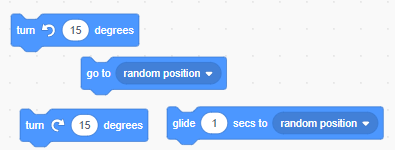
Experiment with the following blocks to teach your cat a better dance style.
Look back at the project you just made. Ask yourself the following questions:
Does the program work as I expected? Why / why not?
What works well?
What works less well?
How can I approach it differently?
REFLECT
Download
Click the link below to download a sample solution.
Upload the project in Scratch. Click the button below and follow the steps.