
Simon
Everyone knows the Simon game: you have to remember in which order the different colors (and accompanying sounds) are played. It is getting more and more difficult because the number of colors is constantly expanding. Who will get the highest score ?!
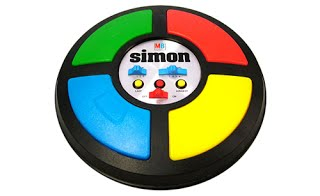
We make our own Simon! The form? You determine that yourself this time too! Who makes the most original Simon version?
You will learn to work with lists today.

Register before you start the exercise. Click the button below and sign up.

ORIENTATE
Take a look at the example and consider the following questions:
- What should I do?
- What are the goals?
- What are the expectations?
- What can I already do?
- What do I still have to discover?
Press the green flag to play the game. Watch the shark and remember what colors it changes to. Press the same color buttons in the correct order. Attention: the next level starts immediately!
PREPARATION
View the steps under 'carry out'. Then answer the following questions:
- Which steps should I follow?
- Which steps can I follow?
- How much time do I need?
- What tools do I need?

PERFORM
Do the steps one by one. Do you not remember how to do it? View the hints or download the solution.
STEP 1
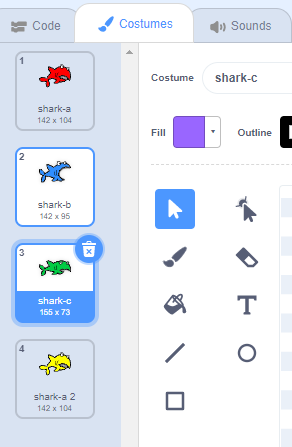
We create a sprite that can take on different colors. The player of our 'game' must then remember in which order the different colors appeared. Open the online Scratch editor and delete the cat. Choose a sprite that you think is cool. Look for a matching backdrop.

With the sprite we chose you will see three different "costumes" by default, in the same colors. Can you also choose a different look for each color that you will soon choose?
STEP 2
We start from the 4 original 'Simon' colors:
- Red
- Blue
- Green
- Yellow
You then give your sprite 4 different 'costumes', each in a different color. You can do this easily with the 'bucket' in the 'costumes' tab.
STEP 3
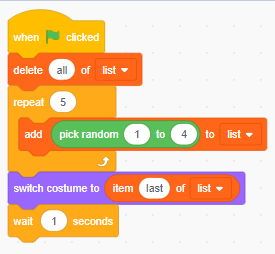
To get the random order of the colors we have to make a "list". A list is a variable that can store a lot of data. For example, you call this list 'order'.
You will now see an empty list in your playing field and a whole series of new blocks under 'Variables':

Then you link the code to your sprite to add a random number to your list 5 times:
Let's try!
If the same color comes twice in a row, it is difficult for your player to find out. This can be solved by having a short sound played on each change of appearance. Too simple for you? Try to have a separate sound for each appearance of your sprite.
STEP 4
STEP 5
Remembering five colors usually works. However, the next level is with a varying length of your order! To do this, create a new variable:
This score is used to determine how many alternating colors the player sees. We will simply start with 2 colors in the first level.
Add this to the code you already have for your 'main sprite':
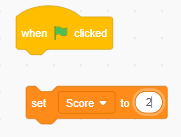
Instead of 'repeat 5 times' we now do:
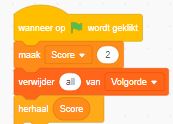
The score will therefore determine how many colors appear.
So we have to increase the score by "1" to increase the length of the sequence:

You have to put all that in a 'repeat' loop.
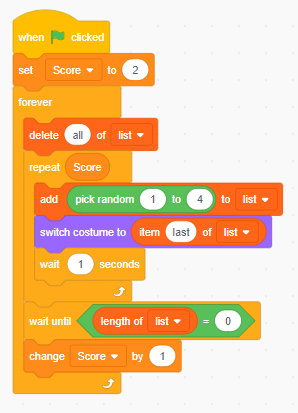
Now hide the 'order' list.

Try out a friends game! Who will get the highest score?
STEP 6

REFLECT
Look back at the project you just made. Ask yourself the following questions:
- Does the program work as I expected? Why / why not?
- What works well?
- What works less well?
- How can I approach it differently?
Download
Click on the link below to download a sample solution.
Upload the project in Scratch. Click the button below and follow the steps.