
Let's race
Racing games are as old as the computer. Time to make one ourselves!
You can again use your creativity to design your own game, but as always the basic elements must be in it.
You learn to:
upload a playing field / backdrop (print or photo from eg Google images)

Register before you start the exercise. Click the button below and sign up.

ORIENTATION
Take a look at the example and consider the following questions:
- What should I do?
- What are the goals?
- What are the expectations?
- What can I already do?
- What do I still have to discover?
PREPARATION
Take a look at the steps at 'perform'. Then answer the following questions:
- Which steps should I follow?
- Which steps can I follow?
- How much time do I need?
- What tools do I need?
PERFORM
Perform the steps one by one. Do you not remember how to do it? View the hints or download the solution.
STEP 1
You already know it: open the online Scratch editor and delete the cat sprite. Choose a suitable backdrop ("playing field"). Preferably take a top view of something or a neutral backdrop. This time, we do not choose a backdrop from the library, but first look for one via Google, for example. You save your chosen photo locally on your computer, for example on the desktop. Then you choose "upload backdrop".
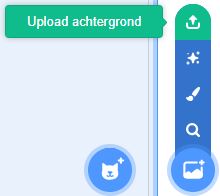
Select your playing field so that you can now update your backdrop: after all, you have to draw a "route" on it and a finish.
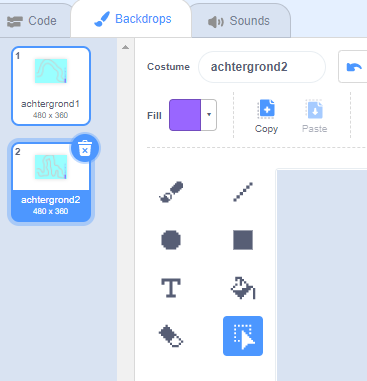
You select the drawing tool "brush" and then thicken the line that you will draw by adjusting the number, at the top left you can also give your line a nice color instead of the boring black standard color. Now draw your own course.
Make up your own finish: that is the place where your car (or other sprite) has to go. To make it easier for you later on, make sure the finish is a different color from the track.
STEP 2
STEP 3
STEP 4
STEP 5

REFLECT
Look back at the project you just made. Ask yourself the following questions:
- Does the program work as I expected? Why / why not?
- What works well?
- What works less well?
- How can I approach it differently?
Download
Click on the link below to download a sample solution.
Upload the project in the Scratch environment. Click the button below and follow the steps.