STEP 1: Sprites and Background
As always, we start with creating the correct sprites and backgrounds.
We have taken a blue background, but you can certainly make it more interesting!
Then you need a sprite that will fly, we use the butterfly.
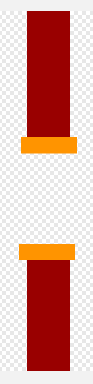
The last sprite you need is the tube you shouldn't be flying into. Make sure you draw the tube long enough! Use the entire height of your drawing area. We will need this if we later want to set the opening of the pipe to a different height.
STEP 2: Fly
We start by letting our butterfly (or other sprite of your choice) fly.
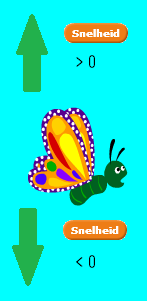
We want to know whether the butterfly should fly up or down and how fast. Therefore, we will create a variable: the speed.
When the speed is positive, the butterfly moves upwards. If it is negative, the butterfly will fall down.
Gravity
If we don't do anything, the butterfly will fall down. This makes it look like gravity acts on the butterfly. In addition, the butterfly will fall faster and faster! We will start by putting this in our code. In the beginning of the program we want the speed to be zero, so the butterfly should not fall or fly.
Now you have to make sure that the program stops when you hit the tube.
Do you still make sure that the tube disappears if it is on the left side of the screen? Make sure that the tube reappears when you click on the flag!
The tubes keep coming
Now the game doesn't last long of course ... You only have to avoid one tube. That is why we want to keep tubes coming. These tubes must always do the same.
You might want to make the same sprite reappear, but then only one tube can appear on the screen at a time. Therefore, we can create a clone of our sprite. For this we use the following blocks:
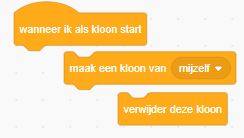
Think carefully, when do you want a new tube to appear? Can you put the right block above in the right place?
Now you still have to make the clone move. You have already created the correct code for this, earlier in this exercise! You will still have to select the correct heading. Instead of making your clone disappear, you can also delete the clone.
Do you make the tube appear on the far right of your screen?

(a) You can make the game even more challenging! Are you not sure when the next tube will come?
(b) To make the game even more attractive, you can vary the appearance of the tube. Take a different color, for example.
Step 4: Keep score
Your game is already working very well! Now we want to keep a score. Do you already start with this? There are a number of things that you can certainly do!
STEP 5: Extensions
Now that your game is fully operational, you can add a number of expansions to it. Below are some ideas.
Provide a nice start screen.
Have an image that appears when you hit a tube.
Provide a sound every time you let the butterfly fly up.
Make sure you're also game-over when you hit the bottom of the screen.
Make the tubes move faster and faster so the game gets harder and harder.
 Well done!!!