
Catching butterflies
In this game we are going to catch butterflies before they hit the purple line. The butterflies move and come closer and closer. Our safety net cannot pass the purple line, so that will not be a simple game ...
You can certainly use other sprites (eg Aliens and a rocket), which makes your game a lot tougher by the way!
You learn to:
- send signals from one sprite to the other sprites
- to use the or block.
- how to make the image of a sprite have no background.

Register before you start the exercise. Click the button below and sign up.
ORIENTATION
Take a look at the example and consider the following questions:
- What should I do?
- What are the goals?
- What are the expectations?
- What can I already do?
- What do I still have to discover?
Use the spacebar to release a beam from the net to catch the butterflies. With the arrow keys you can move the net from left to right. Note: the purple line is sometimes in the way. If the butterflies hit the purple line before they are caught, you are lost.
PREPARATION
View the steps at 'perform'. Then answer the following questions:
- Which steps should I follow?
- Which steps can I follow?
- How much time do I need?
- What tools do I need?
PERFORM
Perform the steps one by one. Do you not remember how to do it? View the hints or download the solution.
STEP 1
As usual, open the online Scratch editor and delete the cat sprite. Choose a nice backdrop from the library.
STEP 2
STEP 3
STEP 4
STEP 5
STEP 6
STEP 7
Multiple butterflies can be obtained by copying the sprite of the butterfly twice. You now only have to adjust the starting position of the butterflies. Make sure that the X positions of all butterflies are different so that they line up nicely next to each other. Give the butterflies each a starting x-position of -100, one of 0, and one of 100. If you now click on the green flag, they will be neatly next to each other.
STEP 8
It's still a bit too easy, maybe isn't it? We are going to make the purple line (the wall) move.
First choose the "wall" and enter the following script:
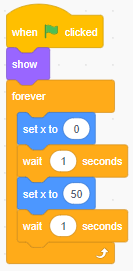
The game is playable, but not really “finished” yet. Think about what can be added to the game.
a) What do you want to add?
b) Explain to another Code Classer how you want to build it and discuss together how you can build it the easiest.
c) Build it! Feel free to ask other students, the coaches or the teacher for help.
d) Did it work? Why yes, why not?
REFLECT
Look back at the project you just made. Ask yourself the following questions:
- Does the program work as I expected? Why / why not?
- What works well?
- What works less well?
- How can I approach it differently?
Download
Click the link below to download a sample solution.
Upload the project in the Scratch environment. Click the button below and follow the steps.