
Love calculator
Challenge your friends to calculate their love for each other! (Of course, not for real! We will simply let the Micro:Bit pick a random number...)
You will learn:
- How to use the pins on the Micro:Bit.
- How to practise a bit more with the blocks you already know.

Register before you start the exercise. Click the button below and sign up.

ORIENTATION
Take a look at the example and consider the following questions:
- What should I do?
- What are the goals?
- What are the expectations?
- What can I already do?
- What do I still have to discover?

Preparation
View the steps at 'perform'. Then answer the following questions:
- Which steps should I follow?
- Which steps can I follow?
- How much time do I need?
- What tools do I need?

PERFORM
Do the steps one by one. Do you not remember how to do it? View the hints or download the solution.
STEP 1
Pins
You will find a couple of pins on the bottom.

That will be P0 to P2 in the editor. You will find them in the ‘Input’ group.
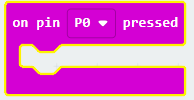
If you want to work with the pins, touch the selected pin (P0) with one hand. Touch GND with your other hand. By doing this, the circuit will close and your program will start.
Try it out!
STEP 2

REFLECT
Look back at the project you just made. Ask yourself the following questions:
- Does the program work as I expected? Why / why not?
- What works well?
- What works less well?
- How can I approach it differently?
Download
Click on the link below to download a sample solution.